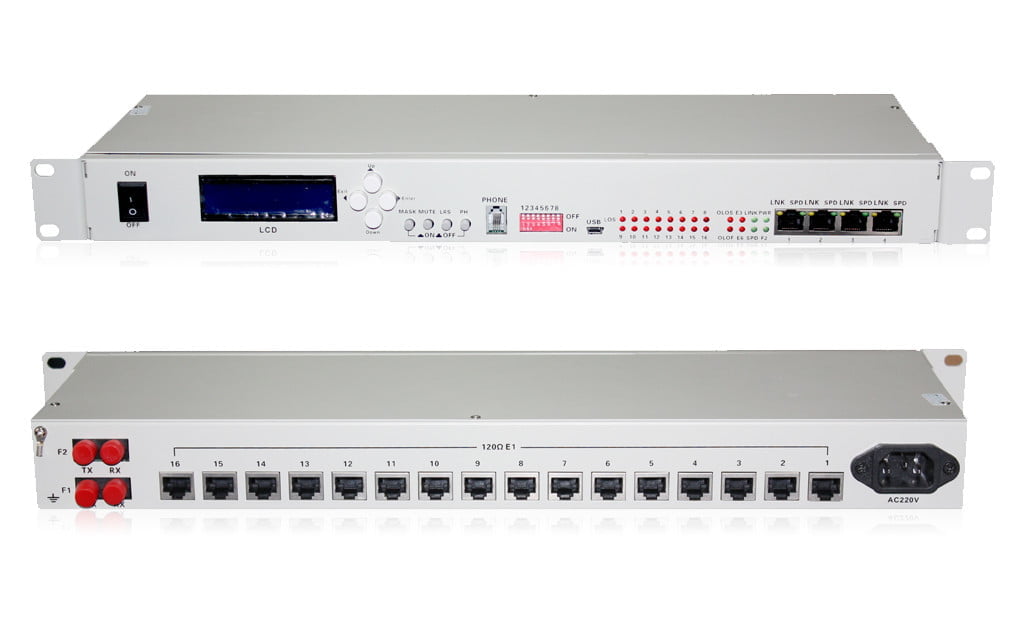
High-Capacity 16 E1 + 4x Ethernet PDH Fiber Optic Multiplexer (20km, Rackmount, Orderwire)

Seamlessly integrate legacy E1 services with modern Ethernet over fiber using our 16E1 + 4×10/100M PDH Multiplexer. This rack-mountable unit offers reliable 20km transmission, an orderwire phone for easy maintenance, and robust performance for telecom and enterprise networks.

SKU: M10459 Category:
Description

Bridge Legacy TDM and Modern Ethernet with Our Versatile 16E1 + 4×10/100M PDH Fiber Optic Multiplexer

Efficiently transmit multiple E1 (G.703) circuits and Fast Ethernet data streams over a single dual fiber optic link with our advanced PDH (Plesiochronous Digital Hierarchy) Fiber Optic Multiplexer. This powerful device is designed to consolidate up to 16 E1 channels and 4 independent 10/100Mbps Ethernet ports, extending your network reach up to 20km. Housed in a standard 19-inch 1U rack-mountable chassis and featuring an integrated orderwire phone, it’s the ideal solution for telecom operators, service providers, and enterprises looking to optimize their fiber infrastructure, support legacy equipment, and ensure reliable point-to-point communication.

Key Features & Benefits:

  • Multi-Service Transmission:
    • Feature: Provides 16 transparent E1 (2.048Mbps) channels and 4 shared 10/100M Fast Ethernet ports.
    • Benefit: Consolidate diverse traffic types onto a single fiber pair, reducing infrastructure costs and simplifying network management. Seamlessly integrate legacy voice/data E1 services with IP-based applications.
  • Extended Reach:
    • Feature: Standard transmission distance of 20km over dual singlemode fiber (other distances like 40km, 60km, 80km, 100km, 120km available as options – verify and list if applicable).
    • Benefit: Connect remote sites, extend enterprise networks, or bridge gaps in telecom infrastructure reliably over significant distances.
  • Robust Ethernet Functionality:
    • Feature: Ethernet ports support 10/100M auto-negotiation, full/half duplex modes, and VLAN tagging. The 4 Ethernet ports share a total bandwidth of 100Mbps.
    • Benefit: Flexible integration with existing Ethernet networks, supporting Quality of Service (QoS) through VLANs and ensuring efficient bandwidth utilization.
  • Integrated Orderwire Phone:
    • Feature: Includes a standard RJ11 engineering orderwire phone port.
    • Benefit: Facilitates direct voice communication between technicians at local and remote ends during installation, commissioning, and maintenance, improving operational efficiency.
  • High Reliability & Diagnostics:
    • Feature: Supports Automatic Laser Shutdown (ALS) for eye safety, remote power-off alarming, and comprehensive loop-back test functions (local and remote) for both E1 and fiber paths.
    • Benefit: Enhances network safety, simplifies troubleshooting, reduces downtime, and allows for quick fault localization.
  • Standard Rack-Mount Design:
    • Feature: Compact 19-inch 1U rack-mountable chassis.
    • Benefit: Easy integration into standard telecom racks and equipment cabinets, saving space and ensuring a professional installation.
  • Optional SNMP Management:
    • Feature: An SNMP (Simple Network Management Protocol) option is available.
    • Benefit: Enables remote monitoring, configuration, and management of the multiplexer through a centralized Network Management System (NMS), providing enhanced visibility and control over network performance. (Elaborate if SNMP offers specific features like alarm reporting, performance statistics, etc.)
  • Flexible Power Options:
    • Feature: Available with AC 220V, DC -48V, or AC+DC dual power supply options. (Confirm these are indeed the options)
    • Benefit: Ensures compatibility with various power infrastructure setups and provides redundancy options for critical applications.

Technical Specifications:

E1 Interface (G.703)

Parameter Value
Interface Code HDB3
Line Speed 2.048 Mbps ± 50 ppm
Line Impedance 75Ω (unbalanced, BNC) / 120Ω (balanced, RJ45 – Confirm connector options)
Connector BNC (75Ω), RJ45 (120Ω) – Specify if both are standard or selectable
Standard ITU-T G.703, G.704, G.823
Jitter Tolerance Complies with G.742 and G.823 standards

Ethernet Interface (10/100M)

Parameter Value
Rate 10/100Mbps, auto-negotiation, Full/Half Duplex
Standard IEEE 802.3, IEEE 802.1Q (VLAN)
MAC Address Table 4096 entries
Connector RJ45
Total Bandwidth 100Mbps (shared across 4 ports)

Fiber Optic Interface

Parameter Value
Wavelength 1310nm / 1550nm (Standard Dual Fiber)
Optical Power -8 dBm ~ -15 dBm (Typical)
Receiving Sensitivity ≤ -36 dBm (BER ≤ 10⁻¹¹)
Connector FC/PC (Standard – confirm if SC/ST also available)
Fiber Type Singlemode (SM)
Transmission Distance 20km (Standard), Options: 40km, 60km, 80km, 100km, 120km (Specify if available)

Orderwire Phone Interface

Parameter Value
Standard Standard RJ11 telephone set compatible
Indication Ringing, busy tone

Power Supply

Parameter Value
Voltage Options AC: 220V (165V~265V) / DC: -48V (-36V~-72V) / AC+DC Redundant (Optional) – Confirm exact options
Consumption ≤ 10W

Working Environment

Parameter Value
Operating Temp. 0°C ~ +50°C
Storage Temp. -40°C ~ +70°C
Relative Humidity 5% ~ 95% (non-condensing)

Dimensions

Parameter Value
19-inch 1U Rack 483mm (L) x 138mm (W) x 44mm (H)

Note: Specifications are subject to change without notice. Please refer to the downloadable datasheet for the most up-to-date information and detailed configuration options.

Versatile Applications for Diverse Network Needs:

Our 16E1 + 4x Ethernet PDH Fiber Optic Multiplexer is an ideal solution for:

  • Telecom Network Expansion: Extending E1 services from central offices to remote subscribers or cell sites.
  • Enterprise Connectivity: Linking PBX systems, legacy data equipment, and LANs between different office buildings or campuses.
  • Mobile Backhaul: Aggregating E1 traffic from 2G/3G base stations and providing Ethernet connectivity for packet-based backhaul.
  • Utility & SCADA Networks: Transmitting critical telemetry and control data (often E1-based) alongside Ethernet for modern SCADA systems in power, oil & gas, and transportation sectors.
  • Leased Line Replacement: Offering a cost-effective alternative to expensive E1 leased lines by utilizing existing or new fiber infrastructure.
  • CCTV & Security Systems: Transmitting E1-based legacy CCTV signals along with IP camera data over fiber.
  • ISP & Service Providers: Delivering bundled E1 and Ethernet services to business customers.

This device may also be known as:

  • 16 E1 PDH Mux
  • E1 over Fiber Multiplexer with Ethernet
  • 16 Port E1 Fiber Optic Multiplexer
  • PDH Optical Transmission Equipment
  • E1 and Ethernet Fiber Converter
  • Fiber Optic Modem 16E1 + 4Eth
  • Rackmount PDH Multiplexer
  • Point to Point Fiber Multiplexer E1 Ethernet

Upgrade Your Network Infrastructure Today!

[Request a Quote ] to discuss how our 16E1+4×10/100M PDH Fiber Optic Multiplexer can meet your specific network requirements. Our experts are ready to assist you.


Frequently Asked Questions (FAQ) about the 16E1 + 4xEthernet PDH Multiplexer:

  • Q1: What is PDH and why would I use this multiplexer?

    A: PDH (Plesiochronous Digital Hierarchy) is a technology used to transport multiple E1 (or T1) circuits, which are common in traditional telecommunications. This multiplexer allows you to transmit up to 16 E1 signals along with 4 Fast Ethernet signals over a single fiber optic pair, saving fiber resources and enabling the integration of legacy TDM services with modern packet-based networks.

  • Q2: What is the maximum distance this multiplexer can transmit data?

    A: The standard model supports transmission up to 20km over dual singlemode fiber. We also offer models with extended reach capabilities, such as 40km, 60km, 80km, 100km, and 120km. Please specify your distance requirement when requesting a quote.

  • Q3: How does the Ethernet sharing work across the 4 ports?

    A: The four 10/100M Ethernet ports share a total combined bandwidth of 100Mbps. The device supports auto-negotiation and can handle VLAN-tagged traffic, allowing for logical separation and prioritization if needed.

  • Q4: What is an “orderwire phone” used for?

    A: The integrated orderwire phone (RJ11 port) allows technicians at either end of the fiber link to connect a standard telephone set and communicate directly. This is extremely useful during installation, troubleshooting, or routine maintenance without needing a separate communication channel.

  • Q5: What does “ALS Function” mean?

    A: ALS stands for Automatic Laser Shutdown. It’s a safety feature that automatically turns off the optical laser transmitter if the fiber optic cable is disconnected or broken, preventing potential eye damage from invisible laser light.

  • Q6: Is SNMP management included by default?

    A: SNMP (Simple Network Management Protocol) for remote monitoring and management is typically an optional feature. If you require SNMP capabilities, please specify this when ordering or requesting a quote so we can provide the appropriate model.

  • Q7: What E1 interface standards does this device support?

    A: It supports ITU-T G.703 for the E1 interface, using HDB3 line coding, and is compliant with G.704 for framing and G.823 for jitter performance. Connectors can be BNC (75 ohm unbalanced) or RJ45 (120 ohm balanced) depending on the configuration.

  • Q8: Can I use this multiplexer with different fiber connector types?

    A: The standard fiber optic connector is FC/PC. If you require other connector types like SC/PC or ST/PC, please let us know your requirements, and we can check for available options.

  • Q9: What power supply options are available?

    A: The unit can be configured with AC 220V (wide range 165V~265V), DC -48V (wide range -36V~-72V), or an optional AC+DC dual redundant power supply for enhanced reliability.


Yes, this equipment warrants installation guidance.

Step-by-Step Installation Guide for Your PDH Fiber Optic Multiplexer:

Proper installation is key to the reliable performance of your 16E1 + 4xEthernet PDH Multiplexer. Follow these steps: (Always ensure you are electrostatically discharged before handling equipment and fiber optics.)

  1. Unpacking and Inspection:
    • Carefully unpack the multiplexer and all accessories (power cord, rack-mount ears, user manual if provided).
    • Inspect for any physical damage sustained during shipping. Report any damage immediately.
  2. Rack Mounting (19-inch 1U):
    • Attach the provided rack-mount ears to the sides of the multiplexer chassis using the supplied screws.
    • Securely install the multiplexer into a standard 19-inch equipment rack, ensuring adequate ventilation around the unit.
  3. Grounding:
    • Connect the chassis grounding terminal (if present) to a reliable earth ground point in your rack or facility for safety and optimal performance.
  4. Power Connection:
    • Verify that your power source matches the type indicated on the multiplexer (e.g., AC 220V or DC -48V).
    • Connect the appropriate power cord to the multiplexer’s power input socket and then to your power source.
    • If using a dual power supply model, connect both power sources.
    • Turn on the power. Check the power LED indicator on the front panel.
  5. Fiber Optic Connections:
    • Crucial: Before connecting, ensure all fiber optic connectors (on the multiplexer and your patch cords) are clean. Use appropriate fiber optic cleaning tools.
    • Identify the transmit (TX) and receive (RX) optical ports on the multiplexer. For dual fiber systems, ensure TX from one unit connects to RX on the remote unit, and vice-versa.
    • Connect your singlemode dual fiber patch cords (with the correct connectors, e.g., FC/PC) to the optical ports. Ensure a secure connection.
    • Observe minimum bend radius for fiber cables to prevent signal loss or damage.
  6. E1 Connections:
    • Connect your E1 (G.703) devices (e.g., PBX, routers, channel banks) to the E1 ports on the multiplexer using appropriate BNC (75 ohm) or RJ45 (120 ohm) cables, matching the interface type.
    • Ensure proper cabling for transmit and receive pairs if using balanced connections.
  7. Ethernet Connections:
    • Connect your Ethernet devices (switches, routers, PCs) to the RJ45 Ethernet ports on the multiplexer using standard Cat5e or Cat6 patch cables.
    • The ports support auto-negotiation for speed (10/100M) and duplex (Full/Half).
  8. Orderwire Phone Connection (Optional):
    • If using the orderwire feature, connect a standard analog telephone set to the RJ11 “PHONE” port on the front panel.
  9. Initial Power-Up and Status Check:
    • Once all connections are made, power on the connected E1 and Ethernet equipment.
    • Observe the LED indicators on the front panel of the multiplexer. Look for:
      • Power LED (PWR)
      • Optical Link Status (OPT or LNK)
      • E1 Channel Status LEDs (E1_1 to E1_16 – ALM or LOS indicators)
      • Ethernet Link/Activity LEDs (ETH LNK/ACT)
    • A stable optical link and absence of E1 alarm LEDs generally indicate a successful basic setup.
  10. Configuration and Testing (If Applicable):
    • Refer to the user manual for any specific configuration settings (e.g., via console port if available, or DIP switches for loopback tests).
    • Perform loop-back tests if necessary to verify E1 channel integrity.
    • Test Ethernet connectivity and data throughput.
    • Test the orderwire phone if connected.
    • If SNMP management is included, configure it according to your network management system requirements.

Disclaimer: These are general installation guidelines. Always refer to the product’s specific user manual for detailed instructions and safety precautions.

5/5 - (1 vote) Please Rate , Thank you ☺️
Reviews (0)

Reviews

There are no reviews yet.

Be the first to review “High-Capacity 16 E1 + 4x Ethernet PDH Fiber Optic Multiplexer (20km, Rackmount, Orderwire)”

Your email address will not be published. Required fields are marked *

Downloads