
For testing applications, there are many tools for this function, such as visual faults locator, optical power meter, OTDR, etc. Do you know the loopback cable can be acted as a test tool in the telecommunication? Absolutely, the loopback signal is used for diagnosing the networking problem. The lookback cables can provide a simple and effective means of testing the capabilities of the network equipment, and they are typically used for fiber optic testing applications or network restorations.
What Is Loopback Cable?
A loopback cable is also known as loopback plug or loopback adapter, which is a plug used to test physical ports to identify network issue. It provides system test engineers a simple but effective way of testing the transmission capability and receiver sensitivity of network equipment. In a word, it is a connection device that is plugged into a port to perform a loopback test. There are loopback plugs for many different ports, including serial ports, Ethernet ports, and WAN connections.
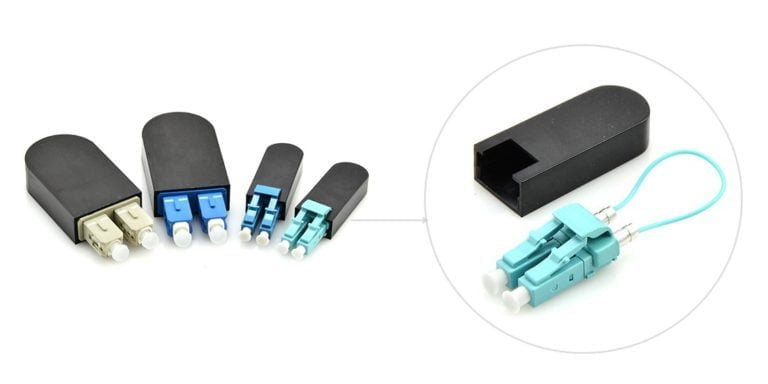
Loopback Cable Type
Fiber Loopback Cable
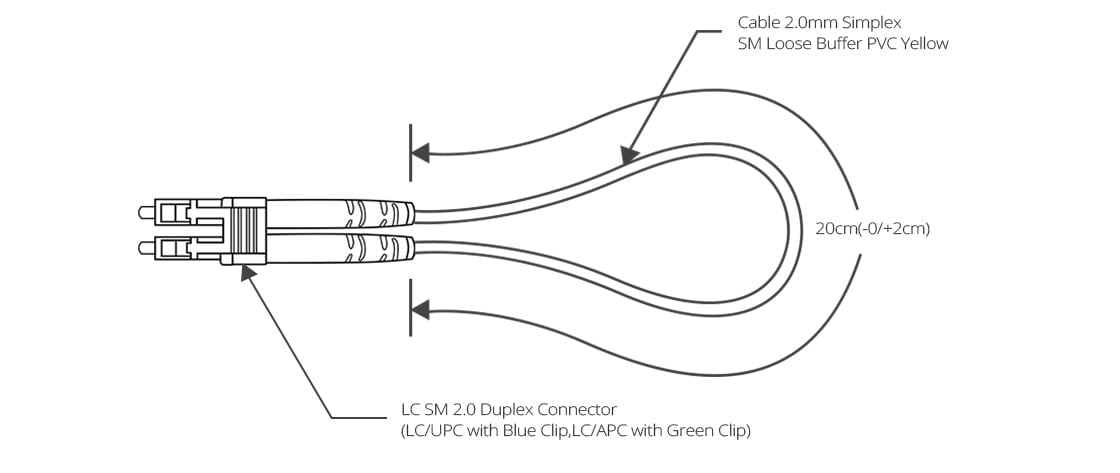
Fiber optic loopback incorprates two fiber optic connectors which are plugged into the output and input port of the equipment respectively. Therefore, fiber loopback cables can be classified by the connector types, such as LC, SC, FC, MTRJ. These fiber optic loopback plug connectors are compliant to IEC, TIA/EIA, NTT and JIS specifications. Besides, fiber optic loopback cables also can be divided into single mode and multimode fiber loopback. To describe this item clearly, I will take LC fiber optic loopback cable as an example, which is one of the most popular cables (as shown in the following figure). The LC fiber optic loopback cables support the test of transceivers featuring LC interface. They can comply with the RJ-45 style interface with low insertion loss, low back reflection and high precision alignment. LC loopback cables can be 9/125 single mode, 50/125 multimode or 62.5/125 multimode fiber type.
RJ45 Loopback Cable
A Gigabit RJ45 loopback cable is an exceedingly user friendly cable tester. It looks like a simple plug at first glance, but the compact and rugged design makes it highly portable and usable in the tightest corners. All you have to do is to simply plug the Gigabit RJ45 loopback into the jack that you want to test or the one you are suspicious about. If the link LED on your switch is active, it means that the connection is operating perfectly. The RJ45 loopback cable will negate the necessity to carry a bulky network hub around.
How to Use Loopback Cable?
The loopback cables are often used in conjunction with testing software to “loop” traffic right back into the port. If the data sent out into the loopback plug is identical to the data received from the loopback plug, you can assume that the basic communication functions of the port are working properly. So the common application of loopback cable is Loopback Test.
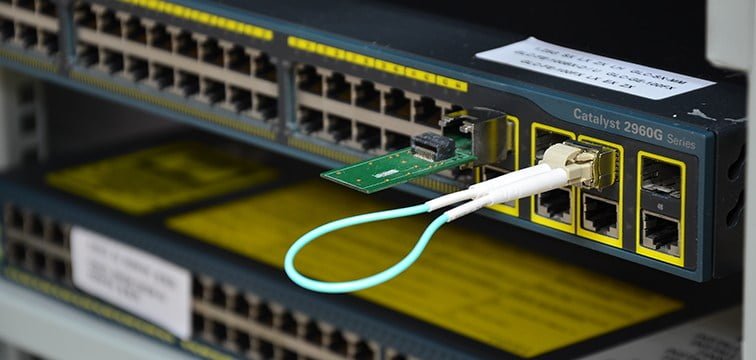
Fiber loopback cable is often utilized to check whether the transceiver module is working perfectly as designed. As we all know, transceiver module has two ports, a transmitter port and a receiver port. The former one is to send out laser signals and the latter is to receive signals. When performing the loopback test, the fiber loopback cable can be directly plugged into the output and input port of transceiver module respectively (the ports at the ends of the connection must be compatible). Thus, during the testing process, the loopback cable directly routes the laser signal from the transmitter port back to the receiver port. Then we can compare the transmitted pattern with the received pattern to troubleshoot a defective node in the network. Fiber optic loopback testing is the easiest way to ensure that the transceiver works faultlessly. When selecting a suitable fiber loopback for the transceiver, we should consider the connector type, polish type, and cable type.
How to Make a Loopback Cable?
To create a physical loopback cable can help to diagnose a suspected hardware problem. This action is recommended because it allows you to test and verify the transmit and receive ports. If a field engineer is not available to create the physical loopback, you can configure a local loopback for the interface. The following illustrated steps are to create a loopback cable for an RJ-45 Ethernet interface:
Step 1: Get a pair of approximately 4 inches in length of Cat5 cable.
(Make sure you create tight twists to account for signal interference at such a short length.)
Step 2: Leave approximately 1/2 inch at end and start twisting, very tightly.
(Note: You’d better use a tool to help with the twisting in order to avoid hurting your fingers. Notice how tightly wound the cable is. If the twists are not close enough, the loopback will not work. )
Step 3: After twisting is done, fold cable and line up the ends. Cut if you must to line up cables. Line up the cables so that the cables are in the proper alignment to prepare for insertion into RJ-45 end.
Step 4: Insert cable into RJ-45 end (Do not crimp yet). Redirect Pin 4 to Pin 8 and Pin 5 to Pin 7 for a Gigabit Ethernet RJ-45 loopback cable.
Step 5: Insert plastic tubing over the wire and into the RJ-45 end. Now crimp the end with a crimping tool.
Step 6: When you create and then test a physical loopback.
Conclusion
All in all, loopback cables play an important role in troubleshooting in laboratories and manufacturing environments. They facilitate the testing of simple networking issues and are available at very low costs. There are many loopback cable manufactures on the market, providing single mode and multimode fiber optic loopback plugs available with FC, LC, MT-RJ, SC connectors. one of the fiber loopback cable providers, all loopback cables are precision terminated and feature extremely low loss characteristics for transparent operation in the test environment.