
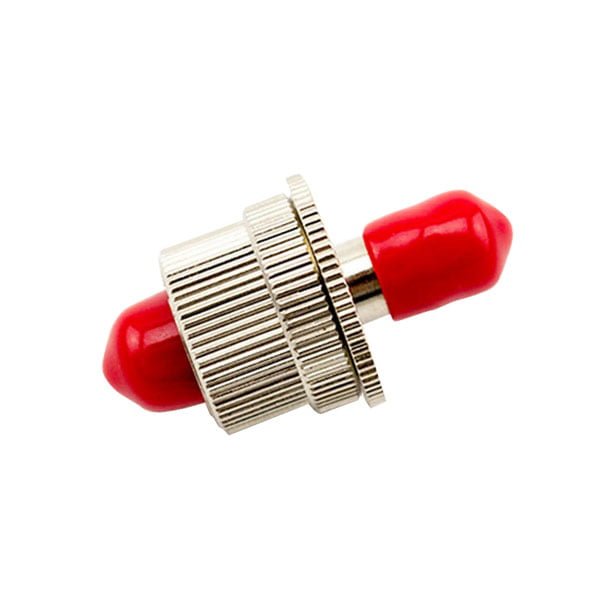
FC Variable Optical Attenuator 1~30dB Female to Female
FC Variable Optical Attenuatoror fiber optic attenuator, is a device used to reduce the power level of an optical signal, either in free space or in an optical fiber. The basic types of optical attenuators are fixed, step-wise variable, and continuously variable.
FC/UPC and FC/APC Type Variable Fiber Attenuator with wide attention range from 1dB to 30dB .All the Attenuator are producted according to industry standards and are 100% fully tested before ship out .
More details show:

FC Variable Fiber Optic Attenuator can be used in fiber optical telecommunication system and optical transmission system.Can be widely apllied in FTTH ,CATV,WAN,fibr optical sensor ,also used as testing equipment .
Our Variable fiber attenuator has Low insertion loss,High return loss ,Easy installation,wide attenuation range 1dB to 30dB,RoHS Compliant .More information for FC Variable Fiber Optical Attenuator
Optical variable attenuator, or variable optical attenuator (VOA), generally uses a variable neutral density filter. VOA is generally used for testing and measurement, but it is also widely adopted in Erbium-Doped Fiber Amplifier (EDFA) for equalizing the light power among different channels.
Adjustable fiber optic attenuator, also called variable fiber optic attenuator, usually is inline type, the appearance like fiber optic patch cord; it is with an adjustable component in the middle of the device to change the attenuation level to a certain figure. There are also handheld variable fiber optic attenuators; they are used as test equipment, and we have the inline fiber optic attenuators.
Single Mode Variable Optical Attenuators allow the user to manually vary the attenuation of the signal in the fiber as it is transmitted through the device. These VOAs can be used to to precisely balance the signal strengths in fiber circuits or to balance an optical signal when evaluating the dynamic range of the measurement system. The maximum specified attenuation is achieved within 10 turns of the adjustment screw
Optical fiber attenuator is a kind of optical passive device. It is used for optical power performance, optical fiber instrument debugging and correction in optical communication systems, attenuates the input optical fiber signal power, and prevents distortion of the optical receiver due to excessive input optical power.
| Optical connector | FC/UPC | Return Loss | ≥65dB |
|---|---|---|---|
| Operating Temp Range | -40~75°C | Humidity | 95%RH |
Variable optical test attenuators generally use a variable neutral density filter. Despite relatively high cost, this arrangement has the advantages of being stable, wavelength insensitive, mode insensitive, and offering a large dynamic range. Other schemes such as LCD, variable air gap etc. have been tried over the years, but with limited success.
They may be either manually or motor controlled. Motor control give regular users a distinct productivity advantage, since commonly used test sequences can be run automatically.
Attenuator instrument calibration is a major issue. The user typically would like an absolute port to port calibration. Also, calibration should usually be at a number of wavelengths and power levels, since the device is not always linear. However a number of instruments do not in fact offer these basic features, presumably in an attempt to reduce cost. The most accurate variable attenuator instruments have thousands of calibration points, resulting in excellent overall accuracy in use.
Female to female variable attenuators from OMC offer defined control of optical signals in both integrated and add-on products.
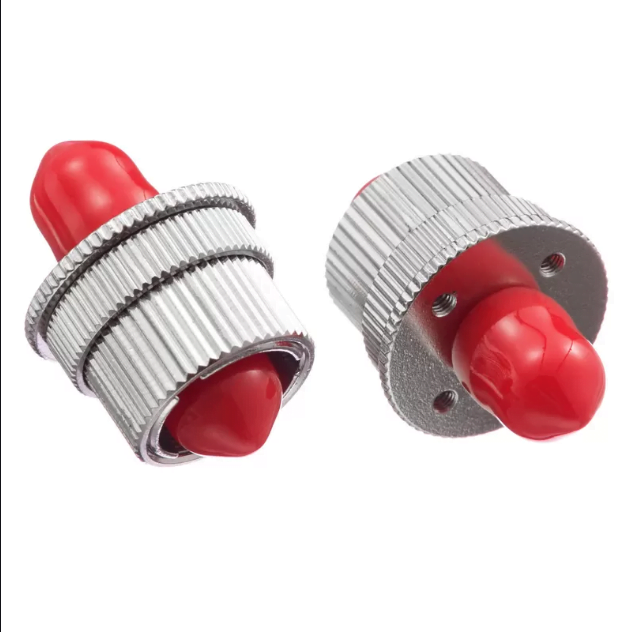 Variable attenuators are used in applications where a pre-determined amount of light loss is specified. Though its applications range widely, attenuators are most commonly used for test and measurement, optical sensors, and telecommunications applications.
Highlights:
1. High quality ceramic core The application of Imported A – grade ceramic insert enable the product with high stability, good reliability , high transmission speed and low insertion loss.
2. Wide attenuation range 1dB to 30dB The FC attenuator from OMC are designed to give the accurate attenuation required by the connected device and are available in a wide range of attenuation levels.
3. Easy Installation The FC attenuator from OMC is designed for optical hardware to reduce the dB power, the plug type allows them to be used directly at the end of a patch cable, they also feature a dust cap on the tips for protection.
Attenuator Specifications
| Fiber Connector | FC | Attenuation method | Variable |
| Attenuation | 1~30dB | Transfer Mode | Singlemode |
| Attenuation Accuracy | ±0.8dB | Operating Wavelength(nm) | 1260~1620(SM) |
| Polarization Dependent Loss | ≤0.2dB | Minimize Insertion Loss | <2.5dB |
| Operating Temp Range | -40~80°C | Max Optical Input Power | 200mW |
Applications
With the excellent characteristics, Female to female Variable Fiber Optic Attenuators can be used in fiber optical telecommunication system and optical transmission system. These attenuators can be applied in FTTH, CATV, WAN, fiber optical sensor and metropolitan area network. They are often used as the testing equipment.
DWDM applications
Test & measurement
Optical sensors
Telecommunications applications


Tom –
FC Variable Optical Attenuator 1~30dB Female to Female