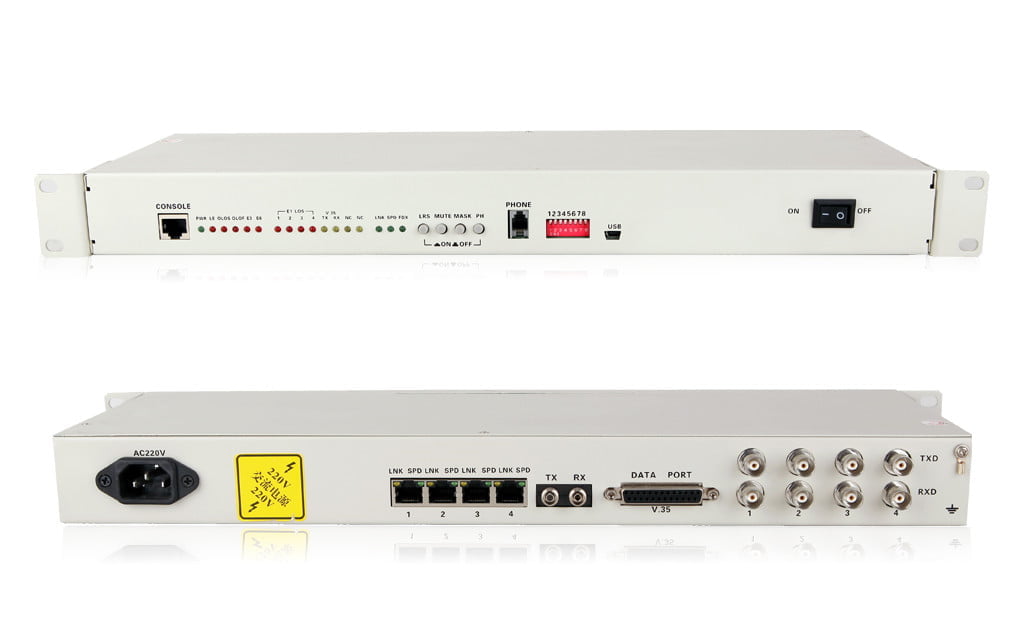
4E1 & 4-Port Ethernet PDH Fiber Optic Multiplexer | Single Mode, 20km, Rack Mount
Reliably extend 4 E1 channels and 4x 10/100M Ethernet ports over single-mode dual fiber up to 20km. This 1U 19-inch rack-mountable PDH multiplexer features an optional orderwire phone and SNMP management for enhanced network connectivity and control. Ideal for telecom and enterprise applications.
Efficiently Bridge E1 and Ethernet Networks with Our Advanced PDH Fiber Optic Multiplexer
The >4E1410-100M PDH Fiber Optic Multiplexer is a robust and versatile solution designed to transmit multiple E1 (G.703) signals and Fast Ethernet traffic over long distances using fiber optic cable. Engineered for reliability and performance, this device is perfect for extending legacy TDM services alongside modern IP networks, making it an indispensable tool for telecommunication providers, enterprises, and utility companies.
This model is configured for single-mode dual fiber transmission up to 20km, housed in a convenient 1U 19-inch rack-mountable chassis, and includes an orderwire phone for easy communication between sites.
Key Features:
- Versatile Connectivity: Provides 4 E1 channels (75Ω BNC or 120Ω RJ45 selectable) and 4 shared 10/100Mbps Fast Ethernet ports.
- Flexible Ethernet Configuration: Ethernet ports support auto-negotiation (10/100M) and can be configured for VLAN tagging and port isolation. Supports wire-speed 100M channels.
- Long-Haul Transmission: Standard configuration supports up to 20km over single-mode dual fiber (SC/FC/ST interface options available). Other distances (up to 120km) and fiber modes (multimode) are available upon request.
- Reliable Performance: Based on self-copyrighted IC, ensuring high integration, stability, and dependable operation.
- User-Friendly Design: Features a 1U 19-inch rack-mountable chassis with an LCD display for easy status monitoring.
- Orderwire Phone: Includes an integrated orderwire phone port for convenient voice communication between multiplexer locations, aiding in installation and maintenance.
- Advanced Management (Optional): Supports SNMP (Simple Network Management Protocol) for remote monitoring and configuration, allowing integration into existing network management systems.
- Power Supply Options: Available with AC 220V, DC -48V, or DC +24V power supply options to suit various deployment environments.
- Comprehensive Diagnostics: Includes alarm indications for E1 loss, AIS, and optical link status.
Benefits:
- Cost-Effective Network Extension: Utilize existing or new fiber optic infrastructure to extend E1 and Ethernet services, reducing the need for expensive leased lines.
- Seamless Integration: Combine legacy E1-based equipment with modern Ethernet networks over a single fiber optic link.
- Enhanced Network Reliability: Fiber optic transmission provides immunity to electromagnetic interference (EMI) and radio frequency interference (RFI), ensuring clearer signals and more stable connections.
- Scalable Solution: While this model is specified for 4E1 and 4 Ethernet, the underlying technology offers flexibility. The modular design allows for stable and reliable performance.
- Simplified Operations: The optional orderwire phone and SNMP management streamline installation, troubleshooting, and ongoing network maintenance.
- Space-Saving Design: The compact 1U rack-mount form factor saves valuable rack space in data centers and telecom closets.
Applications:
This PDH Fiber Optic Multiplexer is ideal for a wide range of applications, including:
- Telecommunication Networks: Extending E1 services for mobile backhaul (2G/3G), PSTN interconnections, and leased line replacements.
- Enterprise Connectivity: Linking corporate PBXs, video conferencing systems, and data networks between buildings or across a campus.
- Utility and Transportation: SCADA system communications, traffic control systems, and railway signaling.
- CCTV and Security: Transmitting E1-based video encoder/decoder signals alongside IP camera data.
- Internet Service Providers (ISPs): Delivering E1 and Ethernet services to business customers.
Technical Specifications:
| Feature | Specification |
|---|---|
| Product Model | 4E1410-100M (or similar, ensure consistency) |
| Function | 4 E1 + 4 Ethernet over Fiber |
| E1 Interface | 4 Channels |
| Impedance: 75Ω (BNC) / 120Ω (RJ45) – Specify if user can choose or default | |
| Standard: ITU-T G.703, G.704, G.823 | |
| Ethernet Interface | 4 Ports (Shared, RJ45) |
| Rate: 10/100 Mbps, Full/Half Duplex Auto-Negotiation | |
| Standard: IEEE 802.3, IEEE 802.1Q (VLAN) | |
| Optical Interface | |
| Fiber Mode | Single-Mode (Dual Fiber) |
| Wavelength | 1310nm (Standard for 20km SM); 1550nm option for longer distances |
| Transmission Distance | 20km (Standard); Options available: 40km, 60km, 80km, 100km, 120km |
| Fiber Connector | SC (Standard); Options: FC, ST |
| Orderwire Phone | Included (RJ11 or similar standard phone interface) |
| Management | LCD Display for local status; Optional SNMP (via Ethernet port or dedicated) |
| Structure | 1U, 19-inch Rack Mountable |
| Power Supply | AC 220V (Default); Options: DC -48V, DC +24V |
| Operating Temperature | 0°C to +50°C (Typical – Verify this, add if available) |
| Storage Temperature | -40°C to +70°C (Typical – Verify this, add if available) |
| Relative Humidity | 5% to 95% (Non-condensing) (Typical – Verify this, add if available) |
| Compliance | List any specific CE, RoHS, FCC, etc. if applicable |
Package Contents:
- 1 x 4E1+4Ethernet PDH Fiber Optic Multiplexer
- 1 x Power Cord (Specify type, e.g., AC for your region)
- 1 x User Manual
- 2 x Rack Mounting Brackets
- (Optional: Fiber patch cords, BNC/RJ45 cables – specify if included or sold separately)
4. FAQ Section (Frequently Asked Questions)
This helps address common queries and can improve SEO.
- Q: What is the main purpose of the 4E1+4Ethernet PDH Multiplexer?
A: This multiplexer is designed to transmit up to 4 E1 (G.703) digital signals and 4 channels of 10/100M Ethernet data over a single pair of fiber optic cables, typically for distances up to 20km with this model. It’s used to extend these services reliably and cost-effectively.
- Q: Can I use this multiplexer for distances longer than 20km?
A: Yes, while this specific model is configured for 20km over single-mode fiber, we offer versions that support transmission distances up to 120km. Please contact us with your specific distance requirements.
- Q: Is the orderwire phone feature standard?
A: Yes, this particular model (
4E1410-100Mas presented) includes the orderwire phone feature. This allows for voice communication between the local and remote multiplexer units, which is very useful during installation and troubleshooting. - Q: What type of fiber optic connectors are supported?
A: The standard configuration typically uses SC connectors. However, we can also provide units with FC or ST connectors upon request. Please specify your preferred connector type when ordering.
- Q: Does this unit support remote management?
A: Yes, this multiplexer can be equipped with optional SNMP (Simple Network Management Protocol) management. This allows for remote monitoring, configuration, and alarm reporting through a network management system. Please specify if you require the SNMP option.
- Q: What are the E1 interface options?
A: The E1 interfaces can be provided as 75 Ohm (BNC connectors) or 120 Ohm (RJ45 connectors). You can specify your requirement at the time of order.
- Q: Are the 4 Ethernet ports switched or independent?
A: The 4 Ethernet ports are typically shared on a switch fabric, supporting 10/100M auto-negotiation and VLAN tagging. They can be configured for port isolation if needed.
5. Installation Steps (Basic Guidance)
Providing basic installation steps can be helpful for users.
Basic Installation Guide:
- Unpacking & Inspection: Carefully unpack the multiplexer and inspect for any physical damage during transit. Ensure all components listed in “Package Contents” are present.
- Mounting (Optional): If rack mounting, attach the provided brackets to the multiplexer and install it securely in a standard 19-inch rack. Ensure proper ventilation around the unit.
- Grounding: Connect the chassis grounding point to a reliable earth ground for safety and optimal performance.
- Power Connection: Connect the appropriate power supply (AC 220V, DC -48V, or DC +24V as per your model) to the multiplexer’s power input. Power on the unit.
- Fiber Optic Connection:
- Clean the fiber optic connectors (on the multiplexer and patch cords) using appropriate fiber cleaning tools.
- Connect the single-mode dual fiber optic patch cords to the designated optical transmit (TX) and receive (RX) ports on the multiplexer. Ensure the TX of one unit connects to the RX of the remote unit, and vice-versa.
- E1 Connections: Connect your E1 devices (e.g., PBX, routers) to the E1 ports on the multiplexer using appropriate BNC (75Ω) or RJ45 (120Ω) cables.
- Ethernet Connections: Connect your Ethernet devices (e.g., switches, PCs) to the RJ45 Ethernet ports on the multiplexer using standard Cat5e or Cat6 Ethernet cables.
- Orderwire Phone Connection (if using): Connect a standard analog telephone to the orderwire phone port (typically RJ11) on both local and remote units for point-to-point communication.
- System Check & Configuration:
- Observe the LED indicators on the front panel for power, optical link status, E1 link status, and Ethernet activity.
- If your unit has an LCD display, check for any error messages or status information.
- If equipped with SNMP, configure network parameters for remote management access.
- Testing: Perform end-to-end testing of E1 circuits and Ethernet links to ensure proper operation.
Disclaimer: This is a basic guide. Always refer to the detailed user manual supplied with the product for complete installation instructions, safety precautions, and advanced configuration options.

Reviews
There are no reviews yet.